
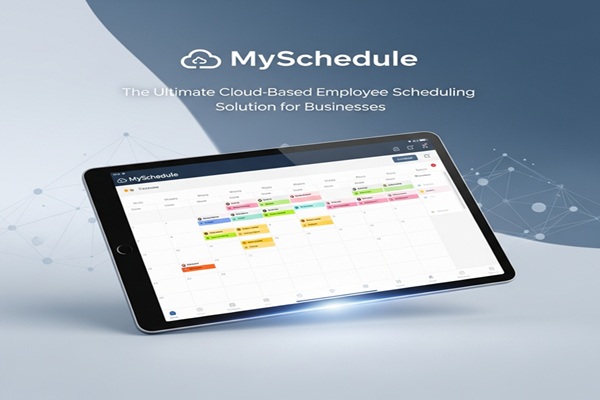
Managing employee schedules can feel like juggling flaming torches—especially if you’re running a small to midsize business. From last-minute shift swaps to tracking time-off requests, keeping everything organized can easily become overwhelming. That’s where MySchedule steps in, offering a cloud-based, all-in-one platform designed to make scheduling simple, accurate, and stress-free. Let’s dive into why this tool has become a favorite among businesses in retail, healthcare, hospitality, and beyond.
What Is MySchedule?
At its core, MySchedule is a cloud-based employee scheduling platform. It allows managers to create, publish, and manage staff schedules efficiently while giving employees easy access to their shifts. Unlike traditional spreadsheets or whiteboards, MySchedule keeps everything digital, centralized, and accessible anywhere—on desktops, tablets, or smartphones.
Here’s what makes MySchedule stand out:
-
Cloud-Based Scheduling – Access schedules anytime, anywhere, from any device.
-
Employee Self-Service – Staff can view shifts, request time off, and swap shifts without chasing managers.
-
Manager Tools – Automated conflict detection, reusable templates, labor tracking, and approvals streamline operations.
-
Built-In Communication – Messaging between employees and managers ensures everyone stays on the same page.
By centralizing scheduling and communication, MySchedule reduces errors, saves time, and improves employee satisfaction.
Key Features That Make MySchedule Shine
1. Cloud-Based Accessibility
No matter where your team is, MySchedule keeps everyone connected. Whether employees are working remotely, at a second location, or traveling, schedules are always up-to-date and available at their fingertips.
2. Employee Self-Service Portal
Employees love transparency. MySchedule allows staff to:
-
Check upcoming shifts instantly
-
Request time off or swap shifts
-
Update their availability
This sense of control reduces confusion and empowers employees to manage their own schedules.
3. Manager-Friendly Tools
Managers benefit from tools that save hours each week:
-
Drag-and-drop shift creation
-
Pre-made templates for recurring schedules
-
Conflict alerts for overlapping shifts or overtime
-
Labor hour tracking for budget management
These features minimize mistakes and allow managers to focus on running the business instead of chasing schedules.
4. Shift Swaps and Availability
Forget endless texts and phone calls. Employees can request shift swaps directly through the platform, and managers approve or deny them in seconds. Instant updates keep the schedule accurate and everyone informed.
5. Communication Tools
Clear communication is key in any workplace. MySchedule’s messaging system includes:
-
One-on-one messaging
-
Group announcements
-
Notifications for schedule changes
This ensures no one misses a shift update, reducing miscommunications that can impact operations.
6. Mobile App Support
With apps for iOS and Android, employees and managers can stay connected on the go. Need to check tomorrow’s schedule or approve a last-minute swap? Everything is available instantly from a phone or tablet.
7. Reporting and Analytics
MySchedule provides actionable insights with:
-
Labor cost tracking
-
Staffing trend reports
-
Shift coverage analysis
These metrics help managers make smarter decisions and optimize workforce planning.
8. Multi-Location Management
Managing multiple locations? MySchedule allows managers to oversee staffing across branches from one dashboard, keeping operations consistent and efficient.
Benefits of Using MySchedule
Saves Time
Manual scheduling can eat up hours weekly. MySchedule automates much of the process, freeing managers to focus on running their business instead of administrative tasks.
Reduces Errors
Double-booked shifts, missed schedules, and last-minute confusion are minimized thanks to real-time updates and conflict detection.
Improves Employee Satisfaction
Employees can view schedules, swap shifts, and request time off without constant back-and-forth, boosting morale and reducing turnover.
Enhances Communication
Centralized messaging ensures everyone receives updates instantly, eliminating confusion and improving team coordination.
Cost-Effective
At roughly $1.99–$2.99 per employee per month, MySchedule offers powerful tools at an affordable price, making it accessible for SMBs without breaking the budget.
Who Can Benefit from MySchedule?
-
Retail – Quickly adjust staff levels for peak hours or seasonal demand.
-
Healthcare – Ensure precise staffing in hospitals, clinics, or care facilities to maintain patient safety.
-
Hospitality – Keep hotel and restaurant shifts flexible for last-minute bookings or cancellations.
-
Government & Education – Streamline employee scheduling for efficiency and transparency.
-
Small to Midsize Businesses – Any shift-based business, from gyms to cleaning services, can benefit.
Pricing and Plans
MySchedule keeps pricing simple and transparent:
-
Free Trial – Test the platform before committing.
-
Subscription – Around $1.99–$2.99 per employee per month.
-
Discounts – Available for larger teams or long-term plans.
This straightforward pricing makes it easy for businesses of any size to adopt without financial strain.
Also Read : Mobilesrus: Your Ultimate Destination for Mobile Phones and Accessories
MySchedule vs. Traditional Scheduling Methods
Old-school methods like spreadsheets, whiteboards, or paper schedules can’t keep up with real-time changes. They’re prone to:
-
Shift errors
-
Miscommunications
-
High administrative workload
MySchedule solves these problems by:
-
Updating schedules instantly
-
Notifying employees in real time
-
Handling shift swaps and time-off requests without chaos
MySchedule vs. Competitors
While tools like When I Work, HotSchedules, and Deputy exist, MySchedule stands out because:
-
It’s affordable and simple
-
Focuses on SMB usability
-
Supports multi-location management at no extra cost
-
Balances manager and employee needs for smoother operations
Tips to Maximize MySchedule
-
Use Templates – Save recurring schedules to reduce manual input.
-
Encourage Self-Service – Train staff to handle shift swaps and requests independently.
-
Leverage Analytics – Track staffing costs and optimize scheduling based on reports.
-
Stay Mobile – Have employees use the app for real-time notifications.
-
Centralize Communication – Use the platform for announcements to avoid missed messages.
The Future of Scheduling with MySchedule
Cloud-based scheduling is just the beginning. Future updates may include:
-
AI-driven recommendations for optimal staffing
-
Predictive scheduling based on historical demand or sales forecasts
-
Even smarter analytics for labor cost optimization
The future points to seamless, data-driven workforce management that reduces stress and improves efficiency.
Conclusion
MySchedule isn’t just another scheduling tool—it’s a game-changer for small and midsize businesses. With cloud access, employee self-service, manager-friendly tools, real-time communication, and affordable pricing, it tackles one of the most challenging aspects of business operations.
By adopting MySchedule, businesses can:
-
Save time and reduce errors
-
Improve employee satisfaction
-
Enhance communication
-
Optimize labor costs
With scheduling headaches gone, managers can focus on growing their business, supporting their teams, and delivering better customer experiences. For SMBs looking to simplify workforce management, MySchedule is an investment that pays off quickly.

